Check every backup automatically after it runs, test the restores your clients rely on most every month, and run a full recovery against each client's agreed recovery time at least once a quarter. Test again after any significant change. A successful backup job tells you data was copied. Only a restore tells you the client can get it back, and how long it will take.
That difference matters more than most service reports suggest. In Veeam's Data Trust and Resilience Report 2026, a survey of more than 900 IT, security and risk leaders, 90% said they were confident they could recover from a cyber incident. Among organisations hit by ransomware, only 28% fully recovered all affected data, and on average they recovered 72%. For an MSP, regular restore testing is how you find out which side of that gap each client is on, before an incident decides it for you.
Why isn't a successful backup job enough?
A green job status confirms that the backup software read the source and wrote a restore point to the repository. It does not confirm that the restore point will boot, that the application inside it will start, or that your team can bring it back within the time the client expects. Corrupted restore points, missing dependencies, expired credentials and network settings that only exist in production all stay hidden until someone tries a restore.
The UK's National Cyber Security Centre has said the same for years. Its guidance on offline backups says backups "should also be regularly tested to check they work as expected", and its principles for ransomware-resistant cloud backups ask system owners to test that they can restore from the current backup state as part of regular monitoring.
What should an MSP test, and how often?
A workable schedule mixes automated checks that run constantly with hands-on tests that prove your people and process work too. This is the rhythm we recommend for MSPs running Veeam for their clients. Adjust the frequency to each client's critical systems and contract, not the other way round.
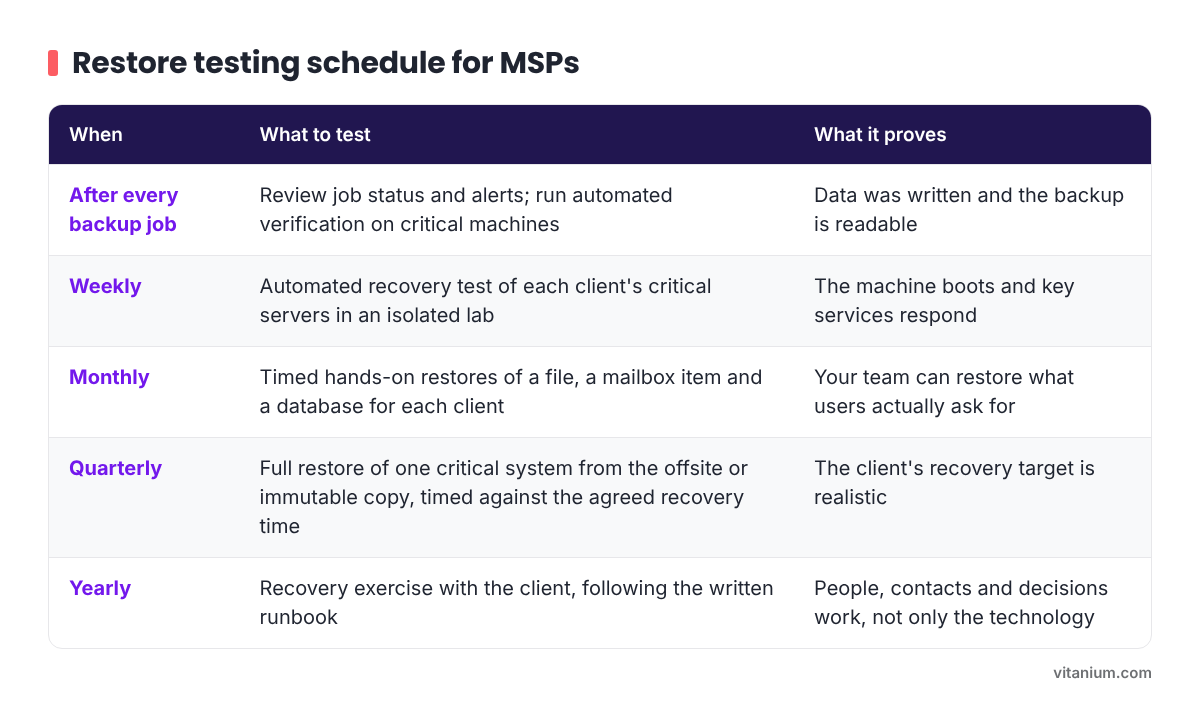
- After every backup job: review job status and alerts, and run automated verification on critical machines. This proves data was written and the backup is readable.
- Weekly: run an automated recovery test of each client's critical servers in an isolated lab. This proves the machine boots and key services respond.
- Monthly: do timed hands-on restores of a file, a mailbox item and a database for each client. This proves your team can restore what users actually ask for.
- Quarterly: fully restore one critical system from the offsite or immutable copy, timed against the agreed recovery time. This proves the client's recovery target is realistic.
- Yearly: run a recovery exercise with the client, following the written runbook. This proves people, contacts and decisions work, not only the technology.
The quarterly test is the one most often skipped, and the one clients care about most. Restoring a single file says little about how long it takes to bring back a line-of-business server and its database from an offsite copy over a real internet connection. Time it, write the number down and compare it with what the client believes.
How do you automate restore checks in Veeam?
Veeam Backup & Replication includes SureBackup for this. According to the Veeam Backup & Replication 13 user guide, SureBackup has two modes. Full recoverability testing runs machines in an isolated environment directly from the backup and performs tests against live applications. Backup verification and content scan checks the backup files without starting the machines.
The difference is important. A content scan can show that a backup is readable and, if enabled, free of known malware, but the machine never boots, so it does not prove recoverability. For servers that a client cannot run without, use full recoverability testing.
The Veeam user guide on virtual labs and a Veeam community guide to SureBackup in v13 cover the setup in detail. In practice it comes down to a few steps:
- Configure a virtual lab. This is the isolated environment where Veeam Backup & Replication starts the machines under test and their dependencies, so tests never touch production. It does not need extra resources provisioned for it, and the same lab can be reused for On-Demand Sandbox and staged restores. A basic lab on a single host is the quickest start; an advanced lab lets you define isolated networks for workloads that span several VLANs. Check in your hypervisor management console that the lab's isolated port groups have no physical uplinks.
- Link the SureBackup job to the backup job, so new machines are included automatically and each test uses the newest restore point.
- Use application groups, so dependencies such as a domain controller or SQL Server start and settle before the server that relies on them.
- Raise the application initialisation timeout for large workloads. The default of 120 seconds is often too short for a busy SQL Server.
- Add custom scripts where a port check is not enough. A port that answers does not always mean the application behind it is healthy.
Automation covers the frequent checks. It does not replace the monthly and quarterly tests, where a person restores real data under real conditions and times it.
When should you test outside the schedule?
Some changes are risky enough to justify a restore test straight away, whatever the calendar says:
- onboarding a new client, or taking over an existing backup setup;
- adding a new critical system or application;
- upgrading Veeam, the hypervisor or the backup repository;
- changing storage, networking or retention settings;
- after any real incident or failed restore.
A new client is the clearest case. Until you have restored their systems yourself, you are relying on someone else's assumptions about what is protected and how quickly it comes back.
How do you prove RTO and RPO to a client?
Recovery time objective (RTO) is how long a client can be without a system. Recovery point objective (RPO) is how much recent data they can afford to lose. Both are agreed numbers (our guide to RPO and RTO explains them in more detail). A restore test turns them into measured ones.
Record the same details every time, so you can show trends and spot drift:
- System, client and date of the test: shows coverage over time.
- Restore point used and its age: the RPO you actually achieved.
- Start and finish time of the restore: the RTO you actually achieved.
- Where it was restored from (local, offsite or immutable): offsite restores can take longer.
- Result and any problem found: evidence that the test was real.
- Fix and retest date: shows that problems get closed.
Share a short summary with the client every quarter. A page that says "we restored your finance server from the offsite copy in a measured time, against an agreed target" is far more reassuring than a dashboard of green ticks, and it starts a useful conversation when the measured time and the target do not match.
Should restore testing be part of your service?
Many clients assume recovery is covered because they pay for backup. Regular, documented restore testing closes that gap in expectations, and it gives you something concrete to show at a quarterly review. It also changes the conversation from the cost of storage to the client's ability to keep trading.
That was the shift one of our MSP partners, TCS, made with its customers. As TCS put it: "We wanted confidence that they could recover from any situation, whether it was ransomware, accidental deletion or an insider threat."
If testing is not in your contracts today, start with each client's most critical system and a quarterly timed restore. The first set of results usually makes the case for the rest.
Frequently asked questions
What is the difference between RTO and RPO?
RTO (recovery time objective) is the longest a system can be unavailable before the business is seriously affected. RPO (recovery point objective) is the maximum amount of recent data, measured in time, that can be lost. RTO drives how fast you must restore. RPO drives how often you must back up. A restore test measures both.
Does SureBackup replace manual restore tests?
No. SureBackup is the right tool for frequent, automated checks that machines boot and services respond. Manual tests still matter, because they prove that your team can find the right restore point, restore individual items that users ask for, and bring a full system back within the agreed time.
Should you test restores from offsite and immutable copies?
Yes. In a ransomware incident, the offsite or immutable copy may be the only clean one left, and restoring from it can take longer. Test it on its own schedule, at least quarterly for critical systems, and record the time separately from local restores.
Do Microsoft 365 backups need restore testing too?
Yes. Test restoring a mailbox item, a OneDrive file, a SharePoint document and a Teams conversation, both to the original location and to an alternative one. These are the restores users ask for most often, and permission or licensing changes can affect them.
What should happen when a restore test fails?
Treat it as a finding, not a failure. Record what went wrong, fix it, and retest within an agreed time. Tell the client what was found and what changed. A documented failed test that was fixed is good evidence that the process works.
If you would like to talk through restore testing for your clients, including recovery from an offsite copy held with Vitanium through Veeam Cloud Connect, book a time with Sam.