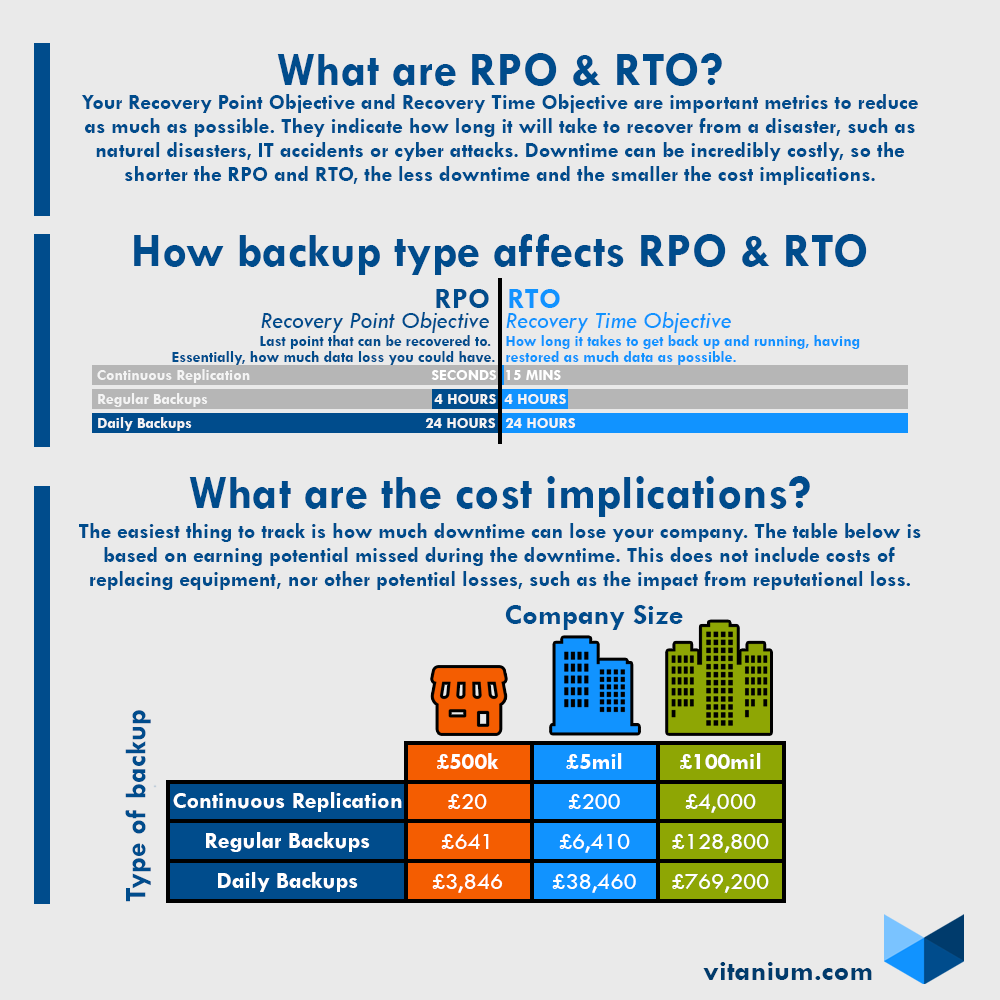
The Recovery Point is the last point in time that you can backup your data/systems from. The Objective is the amount of time and data you can realistically sacrifice. If you can cope with one day’s worth of time and data loss, you can stick to daily backups and scale this all the way down to continuous backups, which backup changes roughly every 20 seconds or so.
What does RTO mean?
RTO means Recovery Time Objective. The Recovery Time is how long it takes to get back up and running with all data recovered and operations resumed. Again, the Objective is how long you can last with not running at full capacity. This can range from days to mere minutes depending on the situation.
Why are they important?
RPO and RTO are key points in a Disaster Recovery plan. They ensure that your downtime and data loss is kept to a minimum to keep you running as smoothly as possible in the event of a disaster, be it natural, accidental or even after cyber attacks.
As for direct costs of downtime, here are the financial impacts based on different RPOs and RTOs for different sized companies.
How to reduce RPO & RTO
Considering they are so important you may be wondering how to reduce Recovery Point Objective and Recovery Time Objective. In terms of data backup, there are a few things you can do.
- More regular backups – The lower you can bring down the time between backups, the better. This could be the difference between nearly instant to several days if you don’t have good data backup processes.
- Replication – Backing up your backups onsite and offsite can bring your RTO down a lot, especially if the backup is instantly replicated/mirrored. If onsite, you can switch to that version instantly, whereas if it is offsite, it is limited by how long it takes to move over to that server, which would take longer than the onsite replication. Of course, if the onsite replication is also affected then this is the best option, despite taking longer.
- Incremental backups – Backing up only the changes to data allows you to reduce time between backups to have more recovery points and also bring down the time it takes to perform backups. This will also allow your recovery time to be faster as you can recover critical files rather than waiting for everything to restore.
For more information on backup, check out Data Backup