Make backups immutable for at least as long as it would take to notice an attack and find a clean restore point. For most MSP clients running Veeam, a sensible starting point is 14 days on the primary backups, 30 days on the offsite copy, and the full retention of any weekly, monthly or yearly restore points kept for the long term. Veeam lets you set as little as 7 days on a hardened repository, but that minimum is a floor, not a target.
Immutability only helps if a clean restore point is still locked when the problem is discovered. If an attacker has been inside a client's network for three weeks and the backups are locked for seven days, the restore points you would trust may already have aged out, or been deleted the moment their lock expired.
What does the immutability period actually protect?
The immutability period is the window in which nobody can delete or change a restore point, including someone holding your backup admin credentials. Veeam's documentation describes it as "the number of days you have to respond to malicious actions". Once that window closes, the restore point is an ordinary file again. Retention can remove it, and so can anyone who has taken over the right account.
A Veeam Hardened Repository adds protection underneath the lock. Veeam says its design stops backup files being deleted or modified even if an attacker exploits the Veeam Data Mover Service or compromises the NTP server, according to its hardened repository guide. The lock itself still lasts only as long as you set it. So the real question is about time: how long would it take your team to spot that something is wrong, confirm the scope, and pick a restore point from before the attacker arrived? The period needs to cover all of that with room to spare.
Why is 7 days usually too short?
Seven days is shorter than the time most intrusions go unnoticed. Mandiant's M-Trends 2026 report puts the global median dwell time, the time an attacker is present before being detected, at 14 days in 2025, up from 11 days the year before. That is a median, so plenty of intrusions run for longer.
For an MSP the gap can be wider still. A problem may first show up as a client's users reporting odd behaviour rather than an alert in your own tools, and the first days of an incident usually go on scoping and containment, not restores. With a 7-day lock, you could reach the point of choosing a restore point and find that every locked copy was written after the attacker got in. A 14-day lock on the primary backups covers the median case. A longer lock on the offsite copy gives you a deeper set of clean restore points for the cases that take longer to surface.
What immutability period should an MSP set for each copy?
Set a period for each copy based on how far back that copy needs to reach. Primary backups are the fast route back, so they need cover for the common case. The offsite copy is the route back when the primary has been damaged or the attack was found late. Long-term restore points exist for audits and problems found months later, so they should stay locked for as long as they are kept.
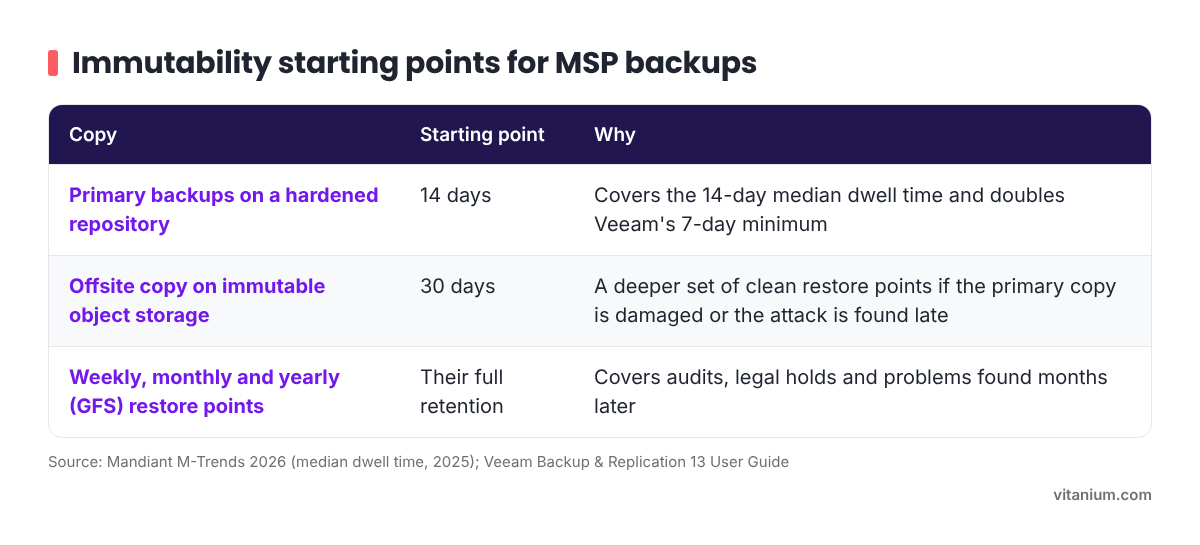
- Primary backups on a hardened repository: 14 days. Covers the 14-day median dwell time and doubles Veeam's 7-day minimum.
- Offsite copy on immutable object storage: 30 days. Gives a deeper set of clean restore points if the primary copy is damaged or the attack is found late.
- Weekly, monthly and yearly (GFS) restore points: their full retention. Covers audits, legal holds and problems found months later.
These are starting points, not fixed rules. Adjust them to each client's recovery objectives, any retention they are required to keep, and the storage you have. If a client already keeps 30 daily restore points on a hardened repository, locking them for 30 days adds little, because those files sit on disk for that long anyway. If your primary repository runs on Windows rather than Linux, Blocky for Veeam is one way to make it immutable.
How does Veeam apply the immutability period?
Veeam's behaviour differs between hardened repositories and object storage, and three details catch people out.
- Long-term restore points look after themselves on a hardened repository. Veeam compares the repository's immutability period with each GFS restore point's lifetime and applies the longer of the two. In Veeam's own example, a 10-day repository period and a 3-year GFS lifetime leave that full backup immutable for 3 years, while its increments stay locked for 10 days.
- Job retention must be longer than the lock. For hardened repositories, Veeam's backup job settings require the job retention period to be longer than the repository's immutability period. Where retention is shorter, the lock wins and the files stay until it expires.
- Object storage locks for longer than the number you type. To cut storage operations and cost, Veeam extends locks in blocks, a process it calls block generation. The default block is 10 days, or 30 days on Amazon S3 and IBM Cloud object storage. In Veeam's example, a 30-day job with 14 days of immutability keeps an extra 14 restore points beyond its retention.
On object storage, Veeam Backup & Replication 13 also lets you choose between locking backups for the entire duration of their retention policy or for a minimum period only, and the actual retention depends on which you pick. Check that setting on every object storage repository, and size the storage for retention plus the lock plus block generation, not retention alone. Our guide to configuring Veeam for ransomware protection with object storage covers the set-up.
Frequently asked questions
Can you shorten an immutability period after it is set?
You can change the setting, but it does not release restore points that are already locked. In Veeam's hardened repository example, backups locked on 3 November with a 20-day period stay immutable until 23 November, even if the period is cut to 7 days the next day. The shorter period applies as new restore points are created. That protects you from an attacker who changes the setting, and it also means a mistake takes time to unwind.
Does a longer immutability period cost more?
It can. Locked restore points cannot be removed until the lock expires, so a longer period means more data held on the repository, and on object storage block generation adds to it. Immutable files also cannot be cleared to free space if a repository fills up. Size repositories for the longest period you plan to use before you raise it, and watch capacity closely after any change.
Does immutability mean a backup will restore?
No. Immutability stops a restore point being deleted or changed. It does not prove the restore point is complete, that it predates the attacker, or that it will boot. A backup existing is not the same as recovering in time, so locked backups still need regular, timed restore tests, and you need a way to tell which restore point is clean before you rely on it.
If you would rather not build and size immutable offsite storage yourself, take a look at ObjectHive S3, Vitanium's immutable S3 object storage.