When Microsoft 365 goes down, an MSP's job is to confirm the cause quickly, tell clients what is and is not working, avoid changes that make recovery harder, and keep a record for the review afterwards. Backup will not help while the outage is running. It protects the data, not the service. Keeping email moving needs a separate continuity layer, and that is the gap this week's outage exposed for many businesses.
This post covers what happened on 12 and 13 November 2026, what to do during an outage like it, and what to put in place before the next one.
What happened in the Microsoft 365 outage?
Microsoft says its Exchange Online incident began at 16:17 UTC on Thursday 12 November, according to Benzinga. In its admin center advisory MO1550821, Microsoft confirmed customers may be unable to connect to Exchange Online, Microsoft Teams, SharePoint Online, Microsoft 365 Copilot and Microsoft Defender XDR, BleepingComputer reported. Downdetector counted more than 130,000 reports about Outlook, and within the hour received reports from 74 countries and territories, ITdaily reported.
Microsoft's explanation so far is that a process on the affected servers responsible for establishing secure connections becomes overwhelmed, causing the servers to stop processing requests, ABC7 reported. The company said it did not suspect malicious activity, CNBC reported.
The impact was uneven. In Teams, calls, meetings and chat largely worked, but features that depend on Exchange, such as scheduling meetings, failed, IT-Connect reported. Safe Links in Microsoft Defender for Office 365 may be unable to verify URLs, which may affect users clicking links in Outlook and Teams, ABC News (Australia) reported.
At the time of writing on Friday 13 November, recovery was partial and not yet sustained. Microsoft has said it will publish full details of the root cause in a Post-Incident Report, CNN reported.
What should an MSP do while Microsoft 365 is down?
Work through these in order. Most of the value is in the first hour, when clients are deciding whether to trust your read of the situation.
- Confirm it is Microsoft, not you. Check Health > Service health in the Microsoft 365 admin center for each tenant you manage. If the admin center itself will not load, Microsoft treats its public status page as the backup notification page. Note the incident IDs (for this outage, EX1550543 and MO1550821).
- Tell clients early, in one message. Say what is affected, what still works (Teams calls and meetings did, this time), and when you will update them next. A short, accurate note beats silence.
- Avoid changes in the middle of the incident. Switching MX records, resetting profiles or reconfiguring tenants rarely helps when the fault is on Microsoft's side, and it can leave you with a second problem to unpick once service returns.
- Warn users about links and workarounds. With Safe Links unable to check URLs, ask users to be careful with links, and not to move work to personal email accounts to get round the outage.
- Keep a timeline per client. When each client was affected, what they reported and when service returned. You will need it for the client review and for any SLA claim.
Does backup help during a Microsoft 365 outage?
Not while the outage is running. A Microsoft 365 backup is there to restore data that has been deleted, corrupted or encrypted. In an outage like this one, the data is still in Microsoft's data centres. What is missing is access to it. That is a continuity problem, and it needs a different tool.
Backup still matters for the days afterwards. Large incidents tend to be followed by recovery work, and if something did go missing, a backup you control is what gets it back. The point is to be clear with clients about which layer does which job, so nobody discovers the difference mid-outage.
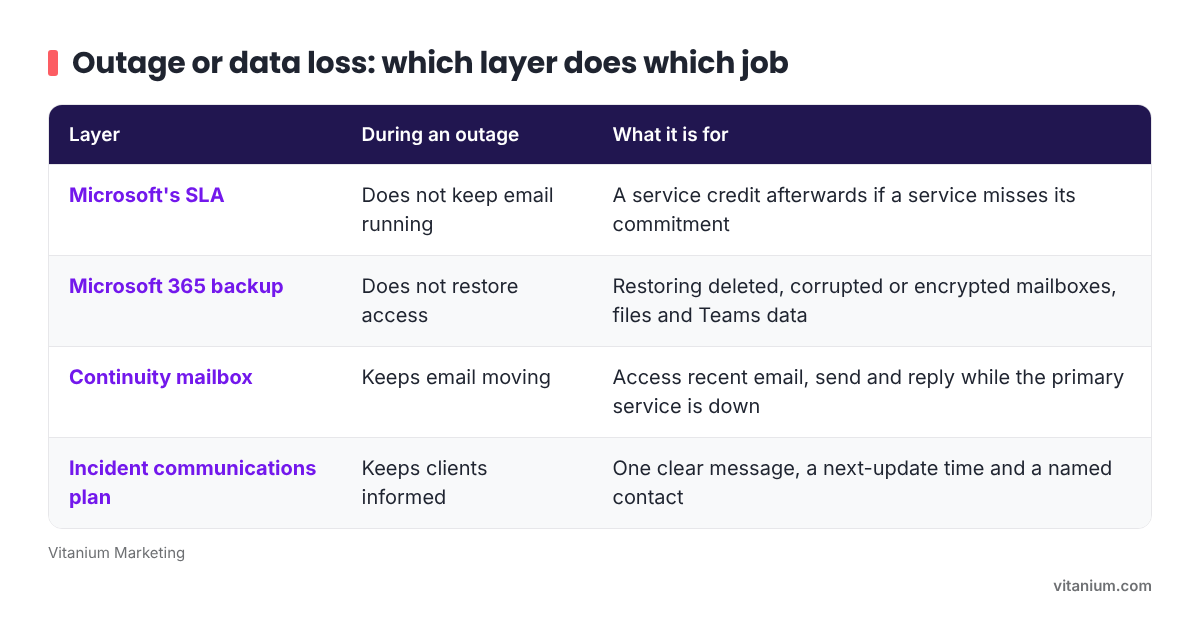
- Microsoft's SLA: does not keep email running during an outage. It can give a service credit afterwards if a service misses its commitment.
- Microsoft 365 backup: does not restore access during an outage. It restores deleted, corrupted or encrypted mailboxes, files and Teams data.
- Continuity mailbox: keeps email moving during an outage. Users can access recent email and send and reply while the primary service is down.
- Incident communications plan: keeps clients informed during an outage, with one clear message, a next-update time and a named contact.
What does Microsoft's SLA cover?
Microsoft's Service Level Agreements describe its commitments for uptime and connectivity for Microsoft Online Services. If a claim is approved, the customer receives service credits, and Microsoft's training material notes that service credits apply only to fees paid for the particular service, service resource, or service tier for which a service level hasn't been met.
So the SLA is a fee adjustment, not compensation for a lost day of trading. It is worth checking once Microsoft's figures are in, and the per-client timeline from the steps above makes that easier. It should not be the plan for keeping a client working.
What should MSPs put in place before the next outage?
Three things, most of which can be done in an afternoon. First, set up service health email alerts in each tenant, and install the Microsoft 365 Admin app, which Microsoft says is a great way to stay current with push notifications. You want to hear about an incident before your clients' phones start ringing.
Second, write a short outage message template now, with gaps only for the services affected and the next update time. Third, talk to clients who rely heavily on email about continuity. Email archiving and a continuity mailbox sit alongside Microsoft 365, so recent email stays reachable when Exchange Online is not. Our Mailhive archiving service includes a continuity mailbox for exactly this, and our Microsoft 365 backup covers the data side.
Once Microsoft publishes its closure summary, Service health will include a final summary of the event, root cause, and start and end times. Share the key points with clients. It closes the loop and shows you were watching.
Frequently asked questions
Was the Microsoft 365 outage a cyber attack?
Microsoft said it did not suspect malicious activity. Its updates point to servers on the affected infrastructure becoming overwhelmed while establishing secure connections. Microsoft has said the full root cause will be set out in a Post-Incident Report, which MSPs can read in Service health once the incident is closed.
Where do I check Microsoft 365 service status if the admin center is down?
Use Microsoft's public service status page. Microsoft describes it as a backup notification page, used when an active issue is stopping customers from reaching the Microsoft 365 admin center or Service health. Service health inside the admin center is more accurate for your tenants, so go back to it once it loads.
Can I restore email from backup during a Microsoft 365 outage?
A backup restores data that has been lost, deleted or encrypted, and restoring into a mailbox needs Exchange Online to be available. During an outage the data is usually intact but out of reach. A continuity mailbox is the tool for keeping email moving until service returns.
Will Microsoft pay compensation for the outage?
Microsoft's SLAs provide service credits, not compensation for business losses. Credits apply only to the fees for the service that missed its commitment, and a claim has to be approved. A per-client record of when each tenant was affected makes it easier to judge whether a claim is worthwhile.