Microsoft 365 Backup is a strong first layer for many MSP clients, but on its own it is rarely the whole answer. It restores SharePoint, OneDrive and Exchange Online quickly from frequent recovery points, yet the backup stays inside the same Microsoft 365 platform it protects, it does not list Teams conversations as a protected workload, and Microsoft does not describe tools for managing it across many client tenants.
That matters because an MSP is judged on whether a client gets their data back in time, whatever went wrong. Microsoft has added a lot to the product in 2026, so the honest answer has changed since most of the comparisons you will find were written. Below is what the service does today, where the gaps are for an MSP, and a simple way to decide client by client.
What does Microsoft 365 Backup actually do?
Microsoft 365 Backup is Microsoft's own pay-as-you-go backup service for SharePoint sites, OneDrive accounts and Exchange mailboxes. Microsoft says it creates backups within the protected services' data boundaries, which is how it restores so quickly.
The recovery points are frequent. For OneDrive and SharePoint, Microsoft lists points every 10 minutes for the previous two weeks and weekly snapshots after that. For Exchange Online, it lists points every 10 minutes for the prior 52 weeks. Restore speed is the headline feature: Microsoft quotes up to 1,000 average-sized accounts, sites or mailboxes at a rate of up to 1-3 TB per hour, while noting that the figures come from Microsoft's own internal tests and that actual times depend on the number and size of items.
Pricing is by consumption rather than per user. Microsoft lists $0.15 per GB per month for all data protected by Backup, and restores are free. As a simple worked example, a tenant with 1,000 GB protected would cost $150 a month at that rate, and the bill rises as the client's data grows.
For a client hit by mass encryption or deletion inside Microsoft 365, that combination of short recovery points and bulk restore speed is hard to beat.
What changed in Microsoft 365 Backup in 2026?
Microsoft has spent 2026 closing several of the gaps that older comparisons point to. Its What's new page lists the changes, and the most relevant for MSPs are these.
On 18 September 2026 backup policies gained configurable recovery windows of 3 months, 6 months, 1 year, or 2 years. On 31 October 2026 SharePoint and OneDrive policies were extended to support any whole number of years from 1 through 10. Shortening a window starts a 30-day grace period before older recovery points are deleted.
On 1 October 2026 Microsoft added a two-person rule when an administrator requests to shorten the offboarding grace period for selected backup items from 90 days to seven days. Activity logs for backup policy and restore operations followed on 13 October 2026. And on 20 November 2026 Microsoft Entra Backup and Recovery Premium entered public preview, enabled through Microsoft 365 Backup.
The two-person rule and the grace periods are delayed-deletion controls, which is exactly the kind of protection the NCSC asks for. If you ruled Microsoft 365 Backup out a year ago because of short retention, it is worth another look.
Where are the gaps for an MSP?
The main gap is independence. Microsoft states that data never leaves the Microsoft 365 data trust boundary. That is good for speed and data residency, but it means the backup and the data it protects share one platform, one tenant and one set of administrator roles.
The NCSC's principles for ransomware-resistant cloud backups set the bar as a design where an attacker who has compromised a system can't make destructive requests without compromising another separate system. Microsoft's new approval and grace-period controls help, but for a client whose tenant is taken over, a second copy held outside Microsoft 365, under separate credentials, is the stronger position. A backup existing is not the same as being able to recover from it when the tenant itself is the problem.
There are also coverage and restore details to check. Microsoft's FAQ says it supports user mailboxes and shared mailboxes, but other Exchange recipient types, including room mailboxes and group mailboxes, aren't supported. Teams channel files live in SharePoint, so they come with the site, but the overview does not list Teams conversations. For OneDrive and SharePoint, granular file and folder restores are available only within the most recent 14 days; older points support full account or site restore only.
Finally, Microsoft's documentation does not describe multi-tenant management for partners, so an MSP sets up billing, policies and restores tenant by tenant.
How does Microsoft 365 Backup compare on the points MSPs care about?
The table sets out what Microsoft documents today against what each point means for an MSP running backup for several clients.
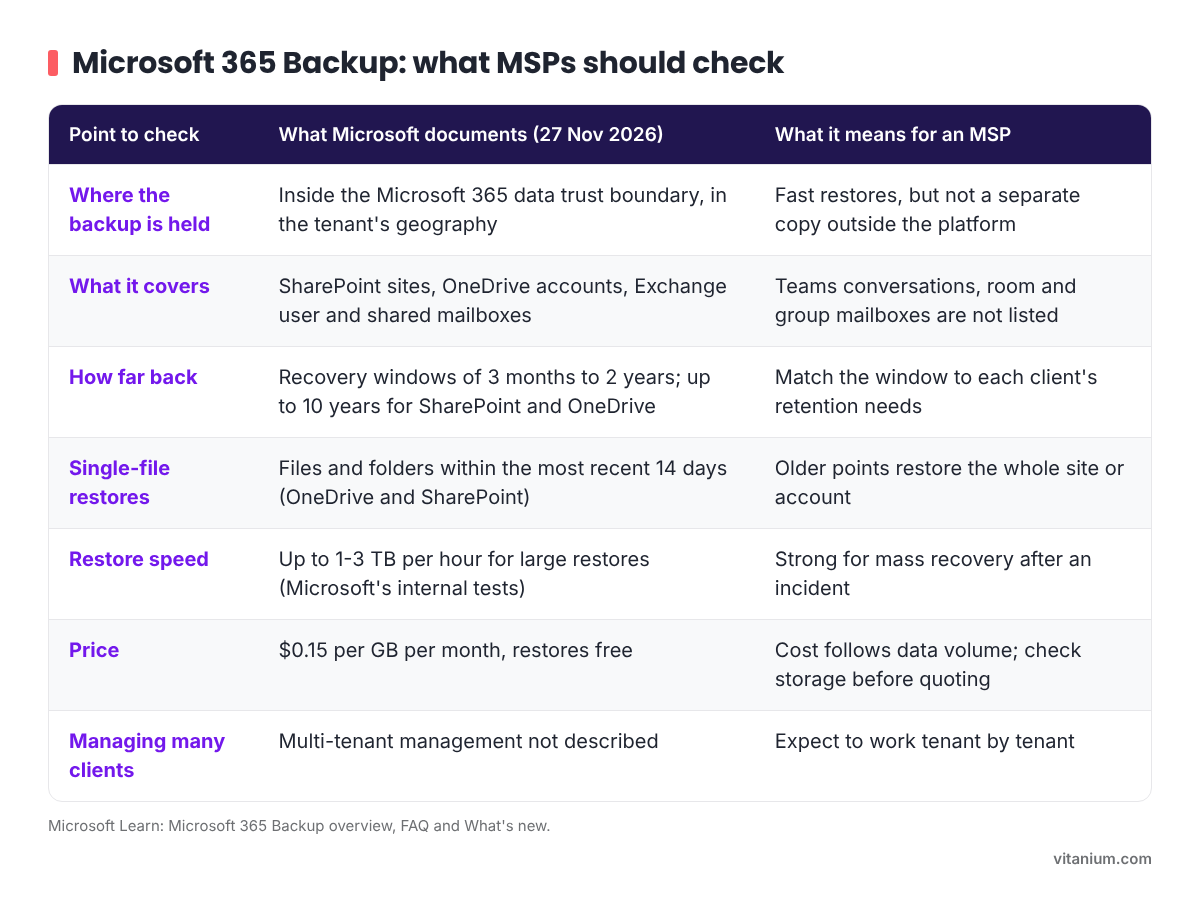
- Where the backup is held: inside the Microsoft 365 data trust boundary, honouring the tenant's geography. Fast restores, but not a separate copy outside the platform.
- What it covers: SharePoint sites, OneDrive accounts, and Exchange user and shared mailboxes. Teams conversations, room mailboxes and group mailboxes are not listed.
- How far back: recovery windows of 3 months to 2 years, and up to 10 years for SharePoint and OneDrive. Match the window to each client's retention needs.
- Single-file restores: files and folders within the most recent 14 days for OneDrive and SharePoint; older points restore the whole site or account. Plan for the older single-file request.
- Restore speed: up to 1-3 TB per hour for large restores, from Microsoft's internal tests. Strong for mass recovery after an incident.
- Price: $0.15 per GB per month, restores free. Cost follows data volume, so check storage before quoting per user.
- Managing many clients: multi-tenant management is not described in Microsoft's documentation. Expect to work tenant by tenant.
When is Microsoft 365 Backup enough on its own?
It can be enough for a client whose main risk is accidental or malicious deletion by a user, whose data volume is modest, who works mainly in SharePoint, OneDrive and Exchange, and who has no contractual or regulatory need for a copy held outside Microsoft. Fast restores and 10-minute recovery points cover most day-to-day requests well.
It is usually not enough on its own when any of these apply: the client has had, or would struggle to survive, a full tenant compromise; their contracts, insurer or regulator expect an independent or offsite copy; they rely on Teams conversations or room and group mailboxes; they regularly need single files from months ago; or the MSP needs one view across dozens of tenants. In those cases the sensible design is both: Microsoft 365 Backup for fast in-platform recovery, and an independent backup for the day the platform or the tenant cannot be trusted.
Whatever the mix, agree the recovery targets with the client first. Our guide to RTO and RPO covers how to set them.
How should an MSP decide, client by client?
Make the decision per client and write it down, so the service you sell matches the recovery the client expects.
- Set the recovery targets. Agree how much data the client can lose and how quickly they need Exchange, SharePoint and OneDrive back.
- Map the workloads. List what the client relies on, including Teams conversations, shared, room and group mailboxes, and large SharePoint sites.
- Check the retention need. Compare contract, insurance and regulatory retention with the recovery windows Microsoft offers.
- Decide on independence. If the client needs to recover from a full tenant compromise, add a copy held outside Microsoft 365 under separate credentials.
- Price the storage. Measure protected data before quoting, since Microsoft 365 Backup is charged per GB.
- Test a restore. Run one single-file and one full-site or mailbox restore, and record the time it took.
If retention has been a recent headache for a client, our earlier post on changes to Microsoft's OneDrive retention policy is a useful companion.
Where does Vitanium fit?
When a client needs that independent copy, our Microsoft 365 backup service is a fully managed, Veeam-powered service that protects Exchange Online, OneDrive, SharePoint and Microsoft Teams. Individual emails, files, folders, mailboxes and SharePoint items can be recovered without restoring entire workloads, and UK-hosted storage options are available for organisations with data residency requirements.
Vitanium handles onboarding, monitoring, storage and platform management, and the service is priced per user with volume tiers and monthly billing, so you can quote it the same way across clients. You can see how one partner approached this in How TISL Took Their Microsoft 365 Backup Strategy to the Next Level.
Frequently asked questions
Does Microsoft 365 Backup cover Microsoft Teams?
Not as a separate workload. Microsoft 365 Backup protects SharePoint sites, OneDrive accounts and Exchange mailboxes. Files shared in Teams channels are stored in SharePoint, so they are protected with the site, but Microsoft's overview does not list Teams conversations. If a client depends on chat and channel history, check how that will be recovered before relying on Microsoft 365 Backup alone.
How much does Microsoft 365 Backup cost?
Microsoft lists $0.15 per GB per month for all data protected by Backup, with free restores. There is no per-user licence: billing runs through an Azure subscription and grows with the amount of data protected. Measure each client's SharePoint, OneDrive and Exchange data before quoting, especially tenants with large sites or many shared mailboxes.
How long does Microsoft 365 Backup keep data?
That depends on the recovery window set in each policy. Since September 2026 policies can use 3 months, 6 months, 1 year or 2 years, and since October 2026 SharePoint and OneDrive policies can run up to 10 years. Granular file and folder restores in OneDrive and SharePoint are limited to the most recent 14 days.
Can an MSP use Microsoft 365 Backup and a third-party backup together?
Yes. Microsoft 365 Backup is set up inside the client's tenant and billed through Azure, so it can run alongside an independent backup. Many MSPs will find that the best fit for higher-risk clients: Microsoft's tool for fast, recent restores inside the platform, and an independent copy for tenant compromise, longer single-item recovery and workloads Microsoft does not list.
If you are reviewing how your clients' Microsoft 365 data is protected, explore our Microsoft 365 backup service or speak to the team about where an independent copy fits.